image-14-scaled

How to Create a Dashboard in Power BI: A Step-by-Step Guide

what-is-microsoft-power-bi-6410345588262008_l

Do you want to create a dashboard in Power BI but are not sure where to start? If so, you are in the right place. Not only is Power BI one of the most in-demand data tools in the world, but it is also free to use and easier to learn than most people think. In short, anyone with basic Excel skills can build a clean, useful Power BI dashboard in just a few hours.

Specifically, this guide walks you through every step — from downloading Power BI to sharing your finished dashboard with your team. Whether you are a student, a business owner, or a data analyst in training, this step-by-step breakdown will get you building fast. Furthermore, the skills you learn here apply to sales dashboards, finance reports, HR trackers, and any other data project you take on.


So, What Exactly Is a Power BI Dashboard?

65cdef0d5bf39730cd742307_ZU7AvePtP3wiH6WL5potaelMwEEPDi65RuRZuDBjmQ5DE6WSA-out-065cdef0d5bf39730cd74230c_8GKaL2oeQA0OOKkGYCzU3b99rjDqJf7Pzt2N9fheAYYhOobJB-out-0

Before diving into the steps, it helps to understand what a Power BI dashboard actually is. Simply put, a dashboard is a single screen that shows your most important data at a glance. It contains charts, cards, tables, and filters that update automatically when your data changes. As a result, you can check your key numbers in seconds without opening a spreadsheet.

However, in Power BI there are two things people call a dashboard — a Report and a Dashboard. Specifically, a Report is where you build visuals on one or more pages using Power BI Desktop. A Dashboard is a pinned collection of visuals from those reports, published in Power BI Service online. In this guide, we cover both. To start, you will build your report in Power BI Desktop, then publish it as a live dashboard online.

Why Build Dashboards in Power BI?

Indeed, Power BI is the tool of choice for dashboard building because of these key reasons:

  • It is free to download and use with no time limit on Power BI Desktop
  • Power bi connects to over 100 data sources including Excel, SQL, Google Sheets, and web pages.
  • The Platform updates your visuals automatically when your underlying data changes.
  • The software runs on desktop, browser, and mobile devices, allowing teams to access dashboards anywhere.
  • The tool is currently the most requested BI platform in Nigerian and African job listings


Step 1: Download and Install Power BI Desktop

First things first — you need to install Power BI Desktop on your Windows PC or laptop. Fortunately, this is completely free and takes only a few minutes. Here is how to do it:

How to Download Power BI Desktop

  • Go to powerbi.microsoft.com on your browser
  • Click the Download Free button on the homepage
  • Choose Power BI Desktop from the options shown
  • Run the installer file and follow the on-screen steps
  • Once installed, open Power BI Desktop and sign in with a free Microsoft account

In addition, you can also download Power BI Desktop from the Microsoft Store on Windows 10 and 11. This method updates the app automatically, which is useful so you always have the latest features. Also, note that Power BI Desktop only runs on Windows. If you use a Mac, you can access Power BI via a browser through Power BI Service instead.


Step 2: Prepare Your Data Before You Import

Next, before you connect your data to Power BI, you need to make sure it is clean and well structured. Specifically, messy data is the number one reason Power BI dashboards look wrong or break. So, take five minutes to fix your data first and save yourself hours of pain later.

Data Cleaning Checklist

Here is what clean data looks like in Power BI:

  • Every column has a clear, short header in row one — such as Date, Product, Sales, Region
  • No merged cells anywhere in the spreadsheet — Power BI cannot read merged cells
  • No blank rows or blank columns in the middle of your data
  • Dates are all in the same format — for example, DD/MM/YYYY throughout
  • Numbers are stored as numbers, not as text — check by aligning cells to the right
  • No totals row at the bottom of the table — Power BI will treat it as a data row

Furthermore, if your data comes from an accounting tool like Sage, QuickBooks, or even a bank statement, export it to Excel first. Then clean it using the checklist above. As a result, your Power BI import will be smooth and your charts will show the right numbers from the start.


Step 3: Import Your Data Into Power BI

Now that your data is clean, it is time to bring it into Power BI. This is called connecting a data source. Specifically, Power BI can connect to many types of data, but for beginners the easiest option is an Excel file. So, here is how to import your first dataset:

How to Import an Excel File

  • Open Power BI Desktop and click Get Data on the Home ribbon
  • Select Excel Workbook from the list of data sources
  • Browse to your Excel file and click Open
  • In the Navigator panel, tick the table or sheet you want to import
  • Click Load to bring the data straight in, or Transform Data to clean it further in Power Query
  • Your data will appear in the Fields panel on the right side of the screen

Using Power Query to Clean Data Inside Power BI

In addition, if your data still needs work after the import, Power Query is your best friend. Specifically, Power Query is a built-in data cleaning tool inside Power BI. To open it, click Transform Data when you load your file. From there, you can remove blank rows, rename columns, change data types, and split columns — all without touching the original Excel file. Moreover, every step you take in Power Query is saved and repeats automatically each time your data refreshes.


Step 4: Build Your First Visuals

This is where the fun begins. Once your data is loaded, you can start building charts. Indeed, Power BI makes this simple — just drag a field from the Fields panel onto the canvas and Power BI picks the best chart type for you. Then you can change the chart type using the Visualizations panel on the right.

The 6 Most Useful Chart Types for Beginners

Not every chart type works for every situation. Therefore, here are the six charts every beginner should master first — along with when to use each one:

Chart Type Best Used For Example Use
Bar Chart Comparing values across groups Sales by product or region
Line Chart Showing trends over time Monthly revenue for the last year
Card Visual Displaying one key number Total sales, total customers today
Pie / Donut Chart Showing parts of a whole Expense breakdown by category
Table Visual Showing detailed row data Top 10 customers by spend
Slicer Filtering the whole dashboard Filter by date, region, or product


How to Add a Chart to Your Report Page

To build your first chart, follow these steps. To start, click on a blank area of the canvas. Then, in the Visualizations panel, click the chart type you want — for example, the bar chart icon. Next, drag a text field such as Product from the Fields panel into the Axis box. After that, drag a number field such as Sales into the Values box. As a result, Power BI will draw your bar chart instantly. You can then resize it by dragging the corners and move it anywhere on the canvas.


Step 5: Format Your Dashboard for a Clean, Pro Look

Building charts is only half the work. Equally important is making them look clean and easy to read. In fact, a well-formatted dashboard gets used far more often than a messy one. So, here are the key formatting steps to take:

Set a Consistent Colour Theme

First, go to View on the top ribbon and select Themes. Power BI has built-in colour themes you can apply in one click. Specifically, choose a theme that matches your brand colours or your company style. Furthermore, using one theme across all charts makes your dashboard look professional rather than patchy.

Add a Title to Every Visual

Next, every chart on your dashboard should have a clear, short title. To add one, click on a chart, then go to the Format panel on the right and turn on Title. Specifically, the title should tell the viewer exactly what the chart shows — for example, Monthly Sales by Region rather than just Sales. This way, anyone who opens the dashboard knows what they are looking at without reading the axes.

Use Card Visuals for Key Numbers

In addition, always put your most important single numbers at the top of the page using Card visuals. For example, a card showing Total Revenue This Month gives the viewer the headline number before they look at any other chart. As a result, the dashboard communicates the most important information in the first two seconds of viewing.

Add Slicers for Easy Filtering

Also, slicers are one of the most powerful features in Power BI. A slicer lets the user filter every chart on the page with a single click. Specifically, add a Date slicer so users can switch between this week, this month, and this year. Then add a Region slicer so sales managers can filter the whole dashboard to their area without any extra work. As a result, one dashboard serves many users with different needs.


Step 6: Set Up Data Relationships for Multi-Table Dashboards

If your data comes from more than one table or Excel sheet, you need to connect those tables using relationships. Specifically, this is how Power BI knows which rows in one table match which rows in another. Furthermore, without correct relationships, your charts will show wrong totals or empty results.

How to Create Relationships in Power BI

  • Click on the Model View icon on the left sidebar — it looks like three connected boxes
  • Power BI will often detect and create relationships automatically when you load related tables
  • To create one manually, drag a field from one table to the matching field in another table
  • A line will appear between the two tables showing the relationship
  • Double-click the line to check the relationship type — most business data uses a Many to One relationship
  • Go back to Report View and your charts will now work across both tables correctly

In addition, the most common relationships in business data are between a Sales table and a Product table joined by a Product ID, or a Sales table and a Date table joined by a date field. So, if your data has ID columns, make sure they match exactly across tables before you build your charts.


Step 7: Add Simple DAX Measures to Power Up Your Dashboard

Once your charts are built, DAX formulas let you create calculated metrics that raw data alone cannot show. Specifically, DAX stands for Data Analysis Expressions and it is Power BI’s built-in formula language. Not only does it look similar to Excel formulas, but it is also far more powerful when working with large datasets.

5 Beginner DAX Measures Every Dashboard Needs

  • Total Sales = SUM(Sales[Revenue]) — adds up all values in the Revenue column
  • Average Order Value = DIVIDE([Total Sales], [Total Orders]) — safe division that avoids errors
  • Sales Growth % = DIVIDE([This Month Sales] – [Last Month Sales], [Last Month Sales]) — month-on-month change
  • Top Product = TOPN(1, Products, [Total Sales]) — returns the best-selling product
  • YTD Sales = TOTALYTD([Total Sales], Dates[Date]) — running total from January to today

Furthermore, to create a DAX measure in Power BI, right-click your table in the Fields panel and choose New Measure. Then type your formula in the formula bar at the top and press Enter. As a result, the new measure appears in your Fields panel and you can drag it into any chart just like a regular column.


Step 8: Publish and Share Your Dashboard Online

Finally, once your report is ready, you can publish it online using Power BI Service so your team can view it in a browser or on their phone. Specifically, this is where your report becomes a live, shareable dashboard. Here is how to publish it:

How to Publish to Power BI Service

  • Click Publish on the Home ribbon in Power BI Desktop
  • Sign in with your Microsoft account if prompted
  • Choose My Workspace as the destination and click Select
  • Wait for the upload to complete — this usually takes under 30 seconds
  • Click the link to open your report in Power BI Service in your browser
  • In Power BI Service, click Pin to Dashboard to create a live dashboard from your report visuals

How to Share Your Dashboard With Your Team

Once your dashboard is live in Power BI Service, sharing it is simple. Specifically, click Share at the top of the dashboard and enter the email addresses of the people you want to share it with. In addition, you can set viewing permissions so some users can only view while others can also edit. Furthermore, anyone you share with can view the live dashboard on the free Power BI mobile app on their phone without needing a desktop installation.

Setting Up Automatic Data Refresh

Also, a key benefit of Power BI Service is automatic data refresh. Specifically, if your Excel file is stored on OneDrive or SharePoint, Power BI can refresh your dashboard data daily or hourly without any manual action. To set this up, go to your dataset in Power BI Service, click the three dots next to it, and choose Schedule Refresh. As a result, your team always sees up-to-date numbers every time they open the dashboard.


Common Mistakes to Avoid When Building Power BI Dashboards

Before you go live with your first dashboard, here are the most common errors that beginners make — and how to avoid each one:

  • Too many visuals on one page: Keep each page to five or six charts maximum. More than that makes the dashboard hard to read. Use separate pages for different topics instead.
  • No clear title or context: Every chart needs a title and every page needs a heading. Without them, viewers cannot understand what they are looking at without asking you.
  • Wrong data types: If a number column is stored as text, your SUM formulas will return zero. Always check that number columns show a sigma symbol in the Fields panel.
  • Missing date table: For time-based charts to work correctly in Power BI, you need a proper date table in your data model. Without one, year-over-year and month-over-month measures will break.
  • Not testing on mobile: Over 60% of dashboard viewers in Nigeria use their phones. Always check your dashboard in the Power BI mobile app before sharing it with your team.
  • Skipping slicers: A dashboard without filters forces you to build separate reports for each user. One slicer can replace ten separate reports. Always add at least a date and region slicer.


Frequently Asked Questions (FAQs)

Q1: So, How Long Does It Take to Build a Power BI Dashboard?

That depends on how clean your data is and how complex the dashboard needs to be. Generally, a basic dashboard with three to five charts and clean Excel data takes two to four hours for a first-time builder. Once you have done it once, your second dashboard will take half the time. So, do not aim for perfection on your first attempt — just focus on getting something working first.

Q2: Furthermore, Can I Build a Power BI Dashboard Without Knowing DAX?

Yes, absolutely. Basic dashboards using bar charts, line charts, and card visuals require no DAX at all. Power BI calculates sums, averages, and counts automatically when you drag number fields into a visual. However, once you want to calculate growth rates, running totals, or year-on-year comparisons, you will need at least a few simple DAX measures. In addition, learning five basic DAX formulas is enough to cover 80% of real business dashboard needs.

Q3: Also, Is Power BI Free to Use?

Power BI Desktop is fully free with no time limit. You can build complete dashboards and export them as PDF or PowerPoint files at zero cost. However, to publish live dashboards online and share them with your team in Power BI Service, you need Power BI Pro at about $10 per user per month. Furthermore, if your organisation uses Microsoft 365, Power BI Pro may already be included in your licence at no extra charge.

Q4: Additionally, Can Power BI Connect to Google Sheets?

Yes, Power BI can connect to Google Sheets via a web connector. Specifically, publish your Google Sheet as a web page using File, Publish to Web in Google Sheets, then copy the CSV link. Next, in Power BI Desktop, click Get Data, choose Web, and paste the link. As a result, Power BI will load your Google Sheet data live and refresh it each time you open the report. This is very useful for teams that store shared data in Google Drive.

Q5: Finally, What Is the Difference Between a Report and a Dashboard in Power BI?

This is one of the most common questions for beginners. Simply put, a Report is built in Power BI Desktop and can have multiple pages with many visuals. A Dashboard is created in Power BI Service by pinning individual visuals from one or more reports onto a single screen. Furthermore, dashboards in Power BI Service are read-only — you cannot edit visuals directly on them. So, always build and edit in the Report first, then pin to a Dashboard for sharing.


Conclusion

Ultimately, creating a dashboard in Power BI is one of the most useful skills you can build in 2025 — whether you are growing a business, climbing the career ladder, or learning data analytics from scratch. In addition, the steps in this guide give you everything you need to go from zero to a published, shareable dashboard in a single day.

Your Next Step Starts Now

To that end, download Power BI Desktop today and open it with one Excel file you already have. Then follow steps one to eight in this guide and build your first chart. Above all, do not wait until your data is perfect or until you know every feature — just start. As a result, you will learn ten times faster by doing than by reading alone. Once your first dashboard is live, the rest of your Power BI journey becomes clear and exciting.

https://www.abujadataschool.com/data-analysis/

power-BI-4-750x420-1

Power BI Nigeria: The Smarter Way to Run Your Business

Are you running a business in Nigeria and still making key choices based on gut feel? If so, Power BI can change that. Not only does it turn raw data into clear, visual dashboards, but it also helps you spot trends, track sales, and act fast. In short, Power BI gives Nigerian business owners the edge they need to make smart choices every single day.

Specifically, this guide covers how to build Power BI dashboards that work for Nigerian businesses. Whether you run a shop in Lagos, a firm in Abuja, or a growing startup anywhere in Nigeria, this step-by-step guide will help. Furthermore, it covers the key charts to use, the data to track, and how to set up your first live dashboard from scratch.


So, What Is Power BI and Why Does It Matter for Nigerian Businesses?

Simply put, Power BI is a free business tool from Microsoft that turns spreadsheet data into visual dashboards. It connects to Excel, Google Sheets, SQL databases, and many other data sources. As a result, you can see all your key business numbers in one clean, easy-to-read screen. Plus, it updates in real time when your data changes.

In Nigeria, many small and mid-size businesses still track sales in Excel files and WhatsApp records. While this works for a while, it becomes slow and hard to manage as the business grows. Therefore, Power BI solves this by pulling all that data together and turning it into charts and tables you can act on right away.

Why Nigerian Businesses Need Power BI Right Now

Indeed, the case for Power BI in Nigeria is strong. Here are the main reasons why more Nigerian firms are now adopting it:

  • Naira volatility means margins shift fast — Power BI lets you see profit changes in real time
  • Most Nigerian banks and fintech apps can export data to Excel, which feeds directly into Power BI
  • FIRS and tax bodies now expect cleaner financial records — Power BI helps you stay audit-ready
  • Nigerian investors and partners now ask for data dashboards as part of due diligence
  • Power BI Desktop is free to download and use — no monthly fee required to get started

Power-BI-For-Business-Intelligence.

So, How Do You Get Started With Power BI in Nigeria?

Before you build your first dashboard, you need to set up the tool. Fortunately, this is quick and free. To begin, follow these three simple steps:

Step 1: Download Power BI Desktop

First, go to powerbi.microsoft.com and download Power BI Desktop for free. It works on any Windows PC or laptop. Indeed, most Nigerian business owners use it on a standard office laptop without any issues. Plus, Microsoft releases updates every month, so the tool keeps getting better at no extra cost.

Step 2: Prepare Your Data

Next, your data needs to be clean before Power BI can use it well. Specifically, this means your Excel files should have clear column headers, no merged cells, and no blank rows. In addition, dates should all be in the same format. If you use accounting software like Sage or QuickBooks, both can export clean Excel files that Power BI reads with ease.

Step 3: Connect Your Data Source

Then, open Power BI Desktop and click ‘Get Data’. From there, choose your source — Excel, CSV, SQL, or even a web link. Power BI will load your data and show it in a table view. At this point, you can clean and shape the data using Power Query before you start building charts. Also, you can connect to multiple sources at once, which is useful if your sales and stock data live in separate files.


Key Dashboards Every Nigerian Business Should Build

Now that your data is connected, let us look at the most useful dashboards for Nigerian businesses. Not all dashboards are equal. Therefore, focus on the ones that solve real problems in your business first. Here are the five most impactful ones to build:

1. Sales Performance Dashboard

To start, every Nigerian business needs a clear view of its sales. A sales dashboard shows total revenue, units sold, top products, and sales trends over time. Specifically, it helps you answer questions like: Which product sold most this week? Which sales rep hit their target? As a result, you can reward good work and fix weak spots fast.

Key charts to include in your sales dashboard:

  • Bar chart: Monthly sales by product or region
  • Line chart: Sales trend over the last 12 months
  • Card visual: Total revenue, total units sold, average order size
  • Map visual: Sales by state or city across Nigeria
  • Table: Top 10 customers by spend this month


2. Cash Flow and Finance Dashboard

Furthermore, cash flow is the lifeblood of any Nigerian business. Many firms are profitable on paper but still run out of cash. In fact, this is one of the top reasons small businesses in Nigeria fail. A cash flow dashboard shows money coming in versus money going out, week by week. So, you can see gaps before they become a crisis.

Key charts to include in your finance dashboard:

  • Waterfall chart: Cash inflows versus outflows by month
  • Line chart: Running cash balance over time
  • Pie chart: Expense breakdown by category (salaries, rent, stock, etc.)
  • Card visual: Days of cash remaining, total receivables, total payables
  • Table: Unpaid invoices sorted by how late they are


3. Inventory and Stock Dashboard

In addition, if your business sells physical goods, a stock dashboard will save you time and money. Specifically, it tracks what items are low, what is moving fast, and what is sitting idle. As a result, you can reorder on time and avoid both stockouts and overstock — two costly problems for Nigerian traders.

Key charts to include in your stock dashboard:

  • Bar chart: Stock levels by product SKU
  • Alert card: Items below reorder level (use conditional formatting to flag in red)
  • Line chart: Stock movement over time — which items move fast
  • Table: Dead stock — items with no sales in the last 30 days
  • Gauge visual: Warehouse fill rate as a percentage


4. HR and Staff Performance Dashboard

Equally, if you have a team, an HR dashboard helps you track staff output without relying on verbal reports. Indeed, it shows attendance, targets hit, leave days used, and output per staff member. Plus, it removes bias from performance reviews because the data speaks for itself. This is especially useful for Nigerian businesses with staff across multiple locations.

Key charts to include in your HR dashboard:

  • Bar chart: Output or sales per staff member this month
  • Card visual: Total headcount, absenteeism rate, open roles
  • Table: Staff leave balances and days remaining
  • Line chart: Headcount growth over the last 12 months
  • Slicer: Filter by department, location, or role


5. Customer Insights Dashboard

Finally, a customer dashboard helps you know your buyers better. Specifically, it shows who your top customers are, how often they buy, and which ones are at risk of leaving. In the same vein, it tracks new customers versus returning ones. As a result, you can focus your sales team on the right people and grow your revenue without finding new customers every time.

Key charts to include in your customer dashboard:

  • Bar chart: Top 20 customers by total spend
  • Line chart: New customers acquired per month
  • Scatter chart: Customer value versus purchase frequency
  • Table: Customers with no purchase in the last 60 days (at-risk list)
  • Card visual: Customer retention rate, average order value, lifetime value


How to Build Power BI Dashboards That Actually Drive Decisions

Building a dashboard is one thing. Building one that people actually use to make choices is another. So, here are the key rules that separate a useful dashboard from one that gets ignored:

Use Simple, Clear Visuals

First, resist the urge to add too many charts to one page. A clean dashboard with five key visuals beats a crowded one with twenty. In fact, the best dashboards in Nigerian businesses tend to have one key metric at the top — such as total revenue today — and supporting charts below. This way, the user knows at a glance if the business is on track.

Add Slicers for Filtering

Next, slicers let users filter the dashboard by date, region, product, or staff member. Specifically, a date slicer is the most useful filter for Nigerian businesses because it lets you compare this month to last month with one click. Plus, slicers make one dashboard work for many users without building separate reports for each person.

Use Nigerian Naira Formatting

In addition, always format your currency fields in Nigerian Naira (NGN). Specifically, go to the column settings in Power BI and set the format to custom, then type the Naira symbol before the number. This way, your dashboard looks professional and avoids confusion when sharing with local partners or investors.

Set Up Automatic Data Refresh

Also, a dashboard that does not update is just a static report. Therefore, use Power BI Service (the free online version) to schedule automatic data refreshes. Specifically, if your data lives in a SharePoint folder or OneDrive, Power BI can refresh it daily or even hourly. As a result, your team always sees live numbers without anyone having to update the file by hand.

Build Mobile-Friendly Views

Furthermore, many Nigerian business owners check data on their phones. In Power BI, you can build a phone layout for each dashboard page. Specifically, go to View and select Mobile Layout, then drag your key visuals into a phone-sized canvas. This way, your sales manager in Port Harcourt can check today’s numbers on the road without needing a laptop.

Common Power BI Mistakes Nigerian Businesses Make

Before you build your first dashboard, it helps to know what to avoid. Indeed, these are the most common errors that waste time and produce bad results:

  • Dirty data: Inconsistent date formats, blank rows, and merged cells in Excel will break your Power BI report. Always clean your data first in Excel or Power Query before connecting it.
  • Too many visuals: Cramming 15 charts onto one page makes the dashboard hard to read. Stick to five or six key visuals per page and use separate pages for different topics.
  • No clear goal: Every dashboard should answer a specific question. If you cannot state what question your dashboard answers in one sentence, start over with a clearer brief.
  • Ignoring mobile: Over 70% of Nigerian internet users access content on mobile. Always build a phone layout for your key dashboards so your team can use them on the go.
  • Not sharing the dashboard: Many teams build great dashboards but only one person can see them. Use Power BI Service to publish and share your dashboards with your whole team for free.
  • Skipping DAX formulas: Basic Power BI charts use raw data. But DAX formulas let you calculate growth rates, running totals, and year-on-year changes. Learning even five basic DAX formulas will make your dashboards ten times more powerful.


Five DAX Formulas Every Nigerian Business Owner Should Know

Not only does Power BI let you display data, but it also lets you calculate new metrics using DAX — Data Analysis Expressions. Here are five formulas that solve real Nigerian business problems:

DAX Formula What It Does Nigerian Business Use
CALCULATE Filters a measure by set rules Calculate sales for Lagos only
SUMX Adds a column row by row Total revenue = price × quantity per item
DIVIDE Divides safely (no error on zero) Gross margin % without divide-by-zero crash
DATEADD Shifts a date by a set period Compare this month sales to last month
RANKX Ranks items in a list Rank top 10 products or sales reps by revenue


Free Power BI Learning Resources for Nigerian Users

In addition to building dashboards, you need to keep growing your Power BI skills. Fortunately, most of the best learning resources are free. Here are the top ones to use right now:

  • Microsoft Learn (learn.microsoft.com): Free, self-paced Power BI courses direct from Microsoft. The Power BI learning path covers everything from basics to DAX and takes about 10 hours to complete.
  • Guy in a Cube (YouTube): One of the best free Power BI YouTube channels. Their videos cover real business use cases and DAX tricks in plain English.
  • com: The best free resource for learning DAX formulas in depth. Their DAX Guide is a free reference for every DAX function.
  • Power BI Community (community.powerbi.com): A free forum where you can post questions and get answers from Power BI experts worldwide — including many African users.
  • org: Covers Excel and Power BI together, which is useful for Nigerian business owners who already know Excel well.
  • Abuja Tech Hub and Lagos Data Community: Local Nigerian tech groups that run free Power BI workshops from time to time. Follow them on LinkedIn and Twitter for event updates.


Frequently Asked Questions (FAQs)

Q1: So, Is Power BI Free for Nigerian Businesses?

Yes, Power BI Desktop is fully free to download and use. You can build dashboards and share them as PDF or PowerPoint files at no cost. However, if you want to publish live dashboards online and share them with your team, you need Power BI Pro, which costs about $10 per user per month. Plus, many Nigerian firms find the free version more than enough to start with.

Q2: Furthermore, Can Power BI Work With Nigerian Accounting Software?

Yes, it can. Most Nigerian accounting tools — including Sage, QuickBooks, and Odoo — can export data to Excel or CSV. Power BI reads both formats with ease. In addition, some tools like Zoho Books and FreshBooks have direct Power BI connectors. So, your financial data can flow straight into your dashboards without any manual export.

Q3: Also, Do I Need to Know Coding to Use Power BI?

No, you do not need to code to build basic dashboards. Power BI is a drag-and-drop tool at its core. However, learning DAX formulas will make your dashboards far more powerful. In fact, most Nigerian business owners pick up the five key DAX formulas in a single weekend. Also, Microsoft Learn offers free, guided DAX tutorials that require no coding background.

Q4: Additionally, How Do I Share My Power BI Dashboard With My Team?

To share a live dashboard, publish it to Power BI Service using your free Microsoft account. Then send the link to your team. Specifically, anyone with a Power BI Pro licence can view and interact with the dashboard in their browser or on the Power BI mobile app. Also, you can export any dashboard page as a PDF or PowerPoint slide and share it via email or WhatsApp.

Q5: Finally, How Long Does It Take to Build a Power BI Dashboard?

That depends on how clean your data is. Generally, a basic sales dashboard with clean Excel data takes two to four hours to build for the first time. Once your data model is set up, adding new dashboard pages takes much less time — often under an hour. So, invest time in cleaning your data well at the start, and every dashboard after that will be fast to build.


Conclusion

Ultimately, Power BI is one of the most useful tools a Nigerian business owner can learn in 2025. Whether you want to track sales, cut waste, or impress investors, a well-built dashboard puts the right data in front of the right people at the right time. In addition, it is mostly free, works with data you already have, and does not require a data science degree to use.

Your First Step Starts Today

To that end, download Power BI Desktop today and connect it to one Excel file you already have. Then build one simple chart. As a result, you will see how fast raw data can become a clear, useful visual. Once you see it work, the rest comes naturally. Above all, remember that the best dashboard is not the most complex one — it is the one your team looks at every day to make better choices.

Data_Scientist_Skills.

Top Data Science Skills Employers in Abuja Are Looking for Right Now

Abuja is rapidly transforming into one of Nigeria’s most exciting technology hubs. As federal ministries, financial institutions, telecoms giants, and a growing wave of tech startups race to make data-driven decisions, the demand for skilled data science professionals in the FCT has never been stronger. So, what do Abuja employers actually look for when they post those job listings?

Whether you are a fresh graduate entering the job market, a professional pivoting into tech, or an experienced analyst ready to level up, understanding which data science skills employers in Abuja actively seek can make the difference between a rejected application and a job offer. In this article, we break down the most in-demand technical and soft skills you need to thrive in Abuja’s data science landscape right now.


Why Abuja’s Data Science Market Is Booming

Nigeria’s capital city has traditionally carried an association with government and policy work. However, a significant digital shift is now well underway. The federal government’s push toward e-governance, digital public services, and data-driven policymaking has created a surge in demand for data professionals across MDAs (Ministries, Departments, and Agencies). At the same time, Abuja’s expanding private sector particularly in banking, health technology, telecommunications, and real estate continues to invest heavily in analytics and business intelligence.

As a result, Abuja-based employers no longer want candidates who simply know how to run reports. Instead, they seek professionals who can extract actionable insights, build predictive models, and communicate findings clearly to non-technical decision-makers. With that context in mind, here is exactly what the market currently looks for.


1. Python and R Programming

Without question, programming proficiency forms the foundation of any data science role in Abuja. Python continues to lead as the language of choice across most organizations and for good reason. Its versatility, massive library ecosystem, and relatively gentle learning curve make it the go to tool for everything from data cleaning to model deployment. R, on the other hand, remains popular in research heavy environments, particularly in public health, academia, and government statistical departments.

What Abuja employers specifically look for:

  • Proficiency in Python libraries such as Pandas, NumPy, Matplotlib, Seaborn, and Scikit-learn.
  • Experience writing clean, reproducible code that can be shared and maintained by teams.
  • Ability to work with R for statistical computing and data visualization where needed.
  • Familiarity with Jupyter Notebooks or similar environments for exploratory data analysis.

Importantly, candidates who demonstrate real projects through GitHub repositories, portfolio websites, or previous work samples consistently stand out in Abuja’s competitive hiring process. Therefore, building a visible portfolio is no longer optional; it is essential.


2. Data Wrangling and SQL

Raw data is rarely clean, and every hiring manager in Abuja knows this. Data wrangling the process of cleaning, transforming, and preparing data for analysis consistently tops the list of non-negotiable skills. Equally critical is SQL (Structured Query Language), which remains the primary tool for querying relational databases across all major industries in Nigeria.

Key competencies employers expect:

  • Writing complex SQL queries including JOINs, subqueries, window functions, and aggregations.
  • Experience with relational databases such as PostgreSQL, MySQL, or Microsoft SQL Server.
  • Ability to handle missing values, duplicates, outliers, and inconsistent data formats.
  • Familiarity with data pipelines and ETL (Extract, Transform, Load) processes.

In Abuja’s government and banking sectors especially, professionals who can extract meaningful data from large, messy institutional databases deliver enormous value. Consequently, SQL mastery is one of the fastest returns on investment you can make in your skill development journey


3. Machine Learning and Predictive Modelling

Machine learning has shifted from a buzzword to a core expectation in many Abuja data science job descriptions. Organizations in finance, telecommunications, and health now deploy ML models for customer churn prediction, fraud detection, credit scoring, and disease surveillance. Employers want candidates who understand not just how to use machine learning algorithms, but when and why to apply them in a given business context.

In-demand machine learning competencies:

  • Supervised learning: regression, classification, decision trees, random forests, and gradient boosting methods like XGBoost.
  • Unsupervised learning: clustering techniques such as K-Means and hierarchical clustering.
  • Model evaluation: cross-validation, confusion matrices, ROC curves, and avoiding overfitting.
  • Basic knowledge of deep learning frameworks such as TensorFlow or PyTorch is increasingly valued.
  • Experience deploying ML models into production environments, even at a basic level.

Notably, candidates who point to specific models they have built and the measurable business impact those models created consistently earn preference over applicants with purely theoretical knowledge. In short, results matter more than credentials.


4. Data Visualization and Business Intelligence Tools

Technical analysis means little if a professional cannot communicate it effectively. Abuja employers particularly those in the public sector, NGOs, and corporate environments place enormous value on data professionals who can turn complex findings into clear, compelling visual narratives. As a result, tools like Power BI, Tableau, and advanced Excel dashboards now appear routinely in job requirements.

Visualization skills in demand:

  • Proficiency in Power BI, with the ability to create interactive dashboards and reports.
  • Experience with Tableau for both exploratory analysis and executive level reporting.
  • Using Python libraries (Matplotlib, Seaborn, Plotly) for custom visualizations.
  • Storytelling with data structuring insights in a way that drives decision-making.

Furthermore, the ability to present a data story to a room full of policymakers or C-suite executives without drowning them in technical jargon is one of the most sought-after yet underrated skills across all of Abuja’s hiring landscape.

Foundational-job-skills-for-data-scientists.


5. Statistical Analysis and Mathematics Fundamentals

A solid grounding in statistics separates a competent data scientist from a truly exceptional one. Employers in Abuja especially in research institutions, federal agencies, and health organizations want candidates who grasp the mathematics behind the models they run, not just those who execute functions from a library without deeper understanding.

Statistical competencies that matter:

  • Descriptive statistics: mean, median, variance, standard deviation, and common distributions
  • Inferential statistics: hypothesis testing, confidence intervals, p-values, and t-tests
  • Probability theory and Bayesian reasoning for robust decision-making under uncertainty
  • Experimental design and A/B testing methodologies to validate business decisions
  • Time series analysis for financial and operational forecasting — a growing priority in Nigerian banking and telecoms

As a result, candidates with strong quantitative backgrounds particularly those from mathematics, statistics, engineering, or economics often carry a distinct edge in roles that demand rigorous analytical thinking. If your math’s foundation is shaky, addressing it now will pay dividends throughout your career.


6. Big Data Technologies and Cloud Platforms

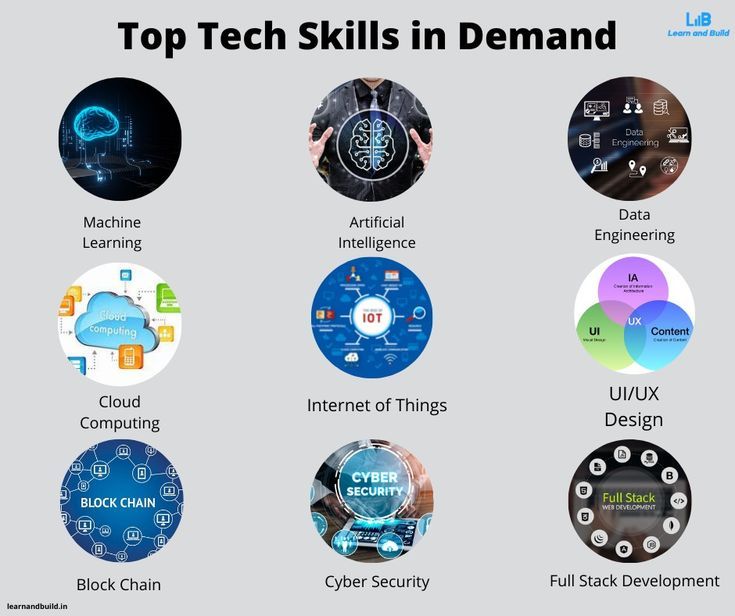
Nigerian organizations now accumulate larger and more complex datasets than ever before. Because of this, familiarity with big data tools and cloud infrastructure appears more frequently in Abuja job descriptions each quarter. While these skills are not universally mandatory at junior levels, they significantly strengthen mid-level and senior candidates’ profiles and they fast-track promotion timelines.

Technologies gaining traction in Abuja’s job market:

  • Apache Spark and Hadoop for processing and analyzing large-scale datasets efficiently
  • Cloud platforms: Microsoft Azure leads in many Nigerian organizations, followed by Google Cloud Platform (GCP) and Amazon Web Services (AWS)
  • Cloud-based data warehousing tools such as Big Query or Azure Synapse Analytics for scalable storage and querying
  • Basic Docker knowledge for packaging and deploying data applications in consistent environments

Specifically, professionals targeting roles in telecoms, fintech, or large federal agencies managing national-level data will find that big data and cloud skills are fast becoming essential not merely a bonus. Earning a Microsoft Azure or Google Cloud certification, therefore, is a strategic move worth making.


7. Communication and Stakeholder Management

Abuja is a city of institutions, ministries, embassies, multilateral agencies, and corporate headquarters. Data science professionals who work in this environment must feel comfortable interacting with senior officials, project managers, and non-technical stakeholders every day. Employers consistently rank soft skills as a critical differentiator between otherwise equally qualified candidates.

Soft skills Abuja employers rank highly:

  • Written and verbal communication: producing clear reports, polished presentations, and accessible technical documentation
  • Stakeholder management: framing technical constraints and findings in language that resonates with decision-makers rather than data teams
  • Critical thinking and problem-solving: approaching ambiguous business challenges with structured, evidence-based frameworks
  • Teamwork and collaboration: contributing productively within cross-functional teams that combine engineers, policy advisors, and business analysts
  • Adaptability: proactively staying current with rapidly evolving tools, techniques, and methodologies

In practice, many Abuja organizations expect the data scientist to bridge the technical team and senior leadership. Professionals who speak both languages fluently technical and managerial are worth considerably more to employers than those who master only one side of that equation.


8. Domain Knowledge in Key Abuja Sectors

Beyond generic data science skills, employers in Abuja increasingly value candidates with relevant domain expertise. Understanding the specific challenges and data landscapes of key local industries gives candidates a decisive, practical edge that technical skills alone cannot provide.

High-value sectors in Abuja’s data economy:

  • Public Sector and Policy: Experience interpreting government datasets, national surveys, and development indicators is especially valuable inside MDAs and multilateral organizations such as UNDP, the World Bank, and other UN agencies with Abuja offices.
  • Financial Services: Knowledge of credit risk, fraud analytics, anti-money laundering (AML) frameworks, and regulatory compliance data gives candidates a significant advantage with banks and fast-growing fintech firms.
  • Health and Public Health: Familiarity with epidemiological data, DHIS2 (District Health Information Software), and health outcome metrics is a growing priority for organizations operating in Nigeria’s health sector.
  • Telecommunications: Understanding of network analytics, customer behavior data, and churn modelling matters greatly for companies like MTN, Airtel, and Glo, each of which maintains major operations in Abuja.


How to Position Yourself for the Abuja Data Science Market

Breaking into or advancing within Abuja’s data science job market takes a deliberate, well executed strategy. Fortunately, several actions consistently produce results for job seekers at every experience level.

  • First, build a project portfolio that solves real Nigerian problems. Analyze publicly available Nigerian government datasets, create health dashboards from NCDC data, or model economic indicators from the National Bureau of Statistics. Local relevance resonates strongly with Abuja hiring managers.
  • Additionally, earn globally recognized certifications from platforms such as Google, Microsoft, Coursera, or DataCamp. Azure and Google Cloud certifications carry particular weight with employers across the FCT.
  • Meanwhile, network actively within Abuja’s growing data community. Industry events, professional meetups, and LinkedIn connections are powerful tools for reaching hiring managers before roles even go public.
  • Similarly, tailor your CV and cover letter to highlight domain-relevant experience for each specific sector you target government roles require different framing than private sector or NGO positions.
  • Finally, stay updated on Nigeria-specific data challenges: electoral data integrity, public health surveillance, financial inclusion, and agricultural productivity analytics are all areas where skilled professionals remain urgently needed right now.


Final Thoughts

Abuja’s data science job market is expanding at a remarkable pace, and the momentum shows no sign of slowing. Employers across both public and private sectors no longer want people who have simply heard of machine learning. Instead, they want professionals who can roll up their sleeves, work with real-world data, and deliver insights that genuinely change how organizations make decisions.

Ultimately, the professionals who thrive in this market combine strong technical foundations with clear communication, relevant domain knowledge, and a habit of continuous learning. The opportunity in Abuja is real and growing. The only question that remains is whether your skill set is ready to meet it and with focused effort, it absolutely can be.

https://www.abujadataschool.com/data-analysis/

How-to-Become-a-Data-Analyst-in-Abuja-in-2026-Step-by-Step-Career-Guide

How to Become a Data Analyst in Abuja in 2026: Step-by-Step Career Guide

Introduction: Why Data Analytics Is the Career to Pursue in Abuja Right Now

Abuja is no longer just Nigeria’s political capital — it is fast becoming one of the country’s most exciting digital economies. From government agencies and international development organisations to fintech startups and healthcare companies, data is driving decisions across every sector in the Federal Capital Territory.

The demand for skilled data analysts in Abuja has never been higher. Companies like eHealth4everyone, Deloitte Human Capital Consulting, FairMoney, ValueGate Consulting, and international bodies like the IFPRI (International Food Policy Research Institute) are actively recruiting data professionals in the city. And the salaries reflect the demand: entry-level data analysts in Nigeria can earn between ₦150,000 and ₦350,000 per month, while experienced professionals command ₦900,000 to ₦1,500,000 or more.

Whether you are a fresh graduate in Abuja, a mid-career professional looking to pivot, or an NYSC member exploring in-demand digital skills, this guide walks you through exactly how to become a data analyst in Abuja in 2026 — step by step.

What Does a Data Analyst Actually Do?

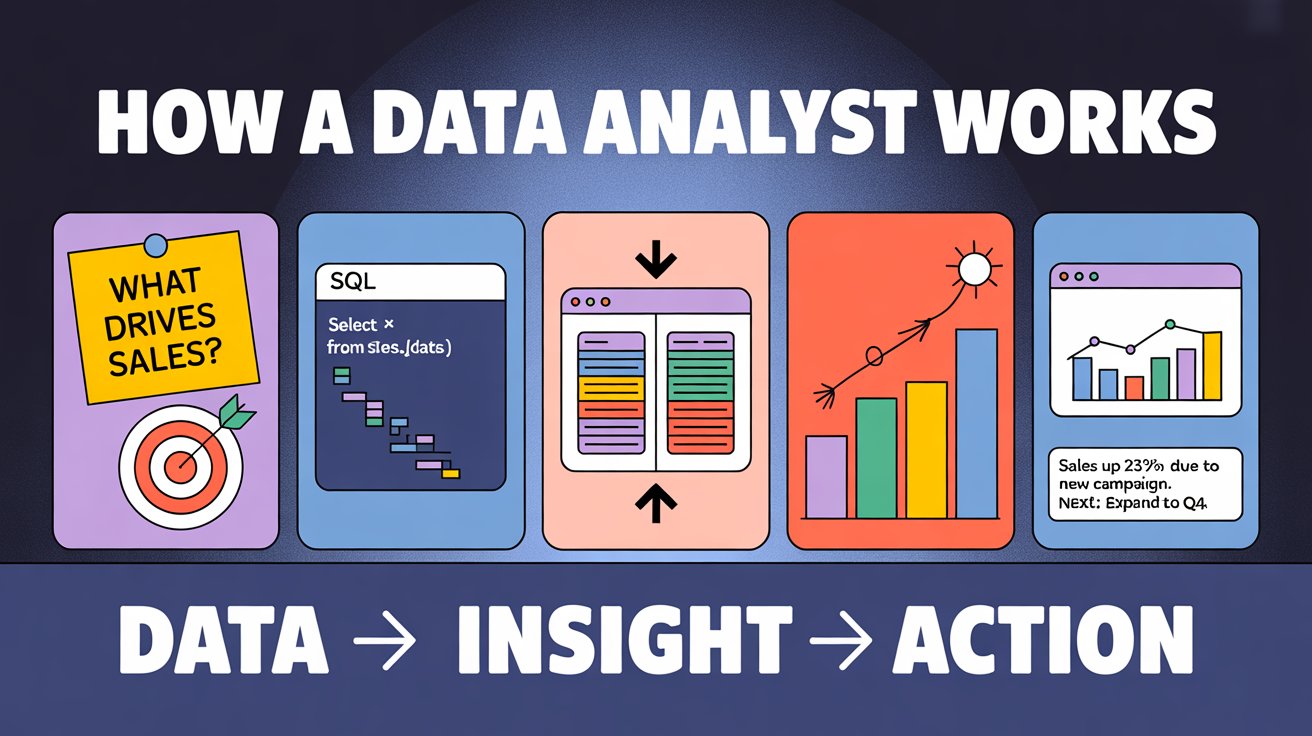
Before diving into the how, it helps to understand the what. A data analyst collects, cleans, interprets, and visualises data to help organisations make better decisions. In Abuja’s job market, data analysts typically:

  • Gather and clean data from business systems, surveys, and databases
  • Build dashboards and reports using tools like Power BI or Tableau
  • Identify trends, patterns, and anomalies in datasets
  • Work with cross-functional teams to translate data into business strategy
  • Support public health, government, finance, and NGO programmes with evidence-based insights

The role sits at the intersection of business and technology — you do not need to be a software engineer, but you do need to be comfortable working with numbers, tools, and stakeholders.

Step 1: Understand the Educational Requirements

You do not need a specific degree to become a data analyst in Abuja, but having a background in a quantitative or technical field gives you a solid foundation. Employers frequently recruit from graduates with degrees in:

  • Statistics or Mathematics
  • Computer Science or Information Technology
  • Economics or Accounting
  • Engineering (especially Electrical, Systems, or Industrial)
  • Public Health or Social Sciences (especially for NGO and government roles)

If your degree is in an unrelated field, do not be discouraged. Many of Abuja’s top data analysts transitioned from non-technical backgrounds. What matters most in 2026 is demonstrable skill — which is where certifications and training come in.

Step 2: Build the Core Technical Skills

Employers in Abuja consistently look for a defined set of technical skills when hiring data analysts. Here are the most in-demand tools and competencies you need to master:

Microsoft Excel

Excel remains the baseline skill for data analysis roles across Nigeria. Entry-level jobs frequently require proficiency in Excel for data manipulation, pivot tables, VLOOKUP, and basic statistical functions. If you are just starting out, Excel is your first stop.

SQL (Structured Query Language)

SQL is used to query databases and extract specific data for analysis. It is one of the most commonly required skills in Nigerian data analyst job descriptions. Learning SQL will allow you to work directly with company databases and significantly increases your employability.

Python or R

As you progress beyond the entry level, Python becomes essential. It is the most widely used programming language for data analysis in Nigeria, used for data wrangling, statistical analysis, and machine learning. R is preferred in research-heavy environments such as public health and academia.

Power BI and Tableau

Data visualisation tools like Power BI and Tableau are the most in-demand tools in Nigeria’s data analytics job market right now. These tools allow you to turn raw data into interactive dashboards that business stakeholders can understand and act on. Power BI, as a Microsoft product, is especially popular among Abuja-based organisations and government-adjacent roles.

Data Storytelling and Communication

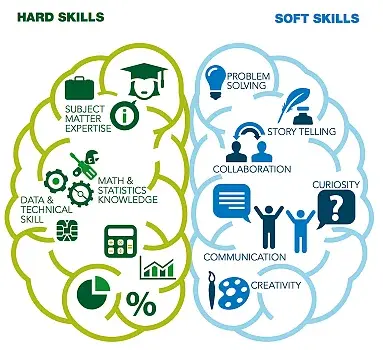
Technical skills alone are not enough. Abuja employers — especially in consulting, development finance, and public sector roles — place a high premium on analysts who can communicate findings clearly to non-technical audiences through presentations, reports, and visualisations.

Step 3: Get Certified

Certifications validate your skills and give you a competitive edge, especially if you are transitioning from a non-technical background or applying for your first data analytics role. The most valued certifications for data analysts in Nigeria include:

  • Google Data Analytics Professional Certificate — A beginner-friendly programme covering data cleaning, problem-solving, and data visualisation. Available on Coursera and widely recognised by Nigerian employers.
  • Microsoft Certified: Data Analyst Associate — Demonstrates proficiency in Power BI, Excel, and data visualisation. Highly valued for roles in organisations that use Microsoft tools.
  • IBM Data Science Professional Certificate — Covers Python, SQL, and data wrangling. Ideal if you want to grow from data analyst into data science.
  • Tableau Desktop Specialist — Focused on data visualisation. A strong addition if you are targeting BI-heavy roles.
  • Certified Analytics Professional (CAP) — A more advanced credential for those seeking to demonstrate broader analytics principles and methodology.

All of these certifications can be completed online through platforms like Coursera, edX, and LinkedIn Learning — many at low cost or even for free with financial aid.

Step 4: Train With a Local Programme in Abuja

Online certifications are valuable, but hands-on, in-person training in Abuja gives you structured learning, real-world projects, community, and local mentorship. Several training institutions in the city offer data analytics programmes:

  • DataLab Analytics (Karu Site, Abuja) — Offers a 3-month hands-on data analytics training programme covering Python, Excel, SQL, Power BI, and Machine Learning. They also offer weekend classes and online training with mentorship from industry experts.
  • CodeBridge Hub (Abuja) — Actively trains young learners in data analysis and visualisation, with a focus on practical skill development.
  • Coursera / edX (Online, self-paced) — Partnered with global universities and companies. Ideal for self-motivated learners who want flexibility alongside local training.

When choosing a training programme, look for ones that offer project-based learning, mentorship, alumni networks, and job placement support. Certificates with no portfolio work are far less valuable than programmes that help you build real deliverables.


data analysis training in Abuja


Step 5: Build a Portfolio

Your portfolio is your proof of skill. In Abuja’s data analytics job market, employers want to see evidence that you can translate data into insights — not just a list of certifications on a CV.

Here is how to build a strong portfolio as a beginner in Abuja:

  • Work with publicly available Nigerian datasets — NIMET (weather data), NBS (National Bureau of Statistics), INEC (election data), or CBN (financial data) are great starting points.
  • Build dashboards in Power BI or Tableau — Create visual reports on topics relevant to Nigerian industries, such as food price inflation, health outcomes by state, or voter turnout analysis.
  • Complete capstone projects from your training programme — These real-world simulations give you work samples that are immediately relevant to local employers.
  • Upload your projects to GitHub — Showcasing your code and methodology on GitHub signals technical credibility to hiring managers and international remote employers.
  • Document your work on LinkedIn — Write posts or articles about the insights you uncovered from your projects. This builds your personal brand and increases your visibility in Abuja’s tech community.

Step 6: Know the Abuja Job Market

Understanding where to look for data analyst roles in Abuja will save you time and help you focus your job search.

Top employers hiring data analysts in Abuja include:

  • eHealth4everyone — A digital health organisation recruiting public health analysts and data professionals
  • Deloitte Human Capital Consulting — Regularly hiring analysts for consulting and advisory roles
  • IFPRI (International Food Policy Research Institute) — Recruits research analysts with strong data and statistical skills
  • ValueGate Consulting — A global consulting firm with data analyst and technical specialist openings
  • FairMoney — A fast-growing fintech with strong demand for data-driven professionals
  • BuyPower and Brooks Advisory Services — Technology and advisory firms with active data roles

Where to search for jobs:

  • Jobberman Nigeria
  • MyJobMag
  • LinkedIn Jobs (filter by Abuja)
  • Glassdoor Nigeria
  • Indeed Nigeria
  • HotNigerianJobs

Set up job alerts on these platforms using keywords like “data analyst Abuja,” “business intelligence Nigeria,” and “SQL analyst FCT” so you are notified as soon as new roles are posted.

Step 7: Understand What You Can Earn

Salary is a major factor in career planning, and the data analytics market in Nigeria offers strong earning potential — especially as you grow your skills and experience.

Here is a realistic salary breakdown for data analysts in Abuja and Nigeria in 2026:

Experience Level Monthly Salary Range
Entry-Level (0–2 years) ₦150,000 – ₦350,000
Mid-Level (3–5 years) ₦300,000 – ₦600,000
Senior-Level (5+ years) ₦600,000 – ₦1,500,000+
Remote / International roles ₦1,200,000 – ₦3,000,000+
Freelance analysts ₦800,000 – ₦2,500,000+

Companies in Lagos and Abuja generally pay higher salaries than other Nigerian cities, though fully remote roles are increasingly narrowing that geographic gap. Fintech, banking, consulting, and international development organisations consistently offer the best compensation packages.

Step 8: Keep Learning and Specialising

The data analytics field evolves rapidly, and continuous learning is what separates good analysts from great ones. Once you have secured your first role in Abuja, here is how to keep growing:

  • Specialise in an industry vertical — Analysts who develop deep domain expertise in finance, public health, agriculture, or telecoms command higher salaries and more senior roles.
  • Learn cloud tools — Platforms like Google BigQuery, AWS, and Microsoft Azure are increasingly part of enterprise data stacks in Nigeria.
  • Explore machine learning — Moving from analytics into data science can dramatically increase your earning potential. Python libraries like Pandas, Scikit-learn, and TensorFlow are your next frontier.
  • Join the Abuja data community — Attend meetups, follow local tech communities like HNG Internship, Ingressive for Good, and She Code Africa. Networking in Abuja’s growing tech ecosystem accelerates your career.
  • Pursue remote opportunities — With strong skills and a solid portfolio, many Abuja-based analysts now work for international companies, earning in dollars or pounds while living in the FCT.

Frequently Asked Questions

Can I become a data analyst in Abuja without a degree in computer science? Yes. Many successful data analysts in Abuja have degrees in Economics, Statistics, Business, or even the Arts. What matters is your skill set and portfolio.

How long does it take to become a data analyst in Abuja? With focused training and self-study, most beginners can become job-ready in 3 to 6 months. Structured programmes like DataLab’s 3-month course are designed precisely for this timeline.

Is data analytics a good career in Abuja in 2026? Absolutely. Demand is growing across government, NGOs, fintech, healthcare, and consulting. Combined with the rise of remote work, data analytics offers one of the strongest career trajectories in Nigeria’s digital economy.

What is the best certification for data analysts in Nigeria? The Google Data Analytics Professional Certificate is the best starting point for beginners. The Microsoft Certified: Data Analyst Associate is highly valued for Power BI-heavy roles in Abuja’s corporate and government sectors.

Conclusion: Your Data Analytics Career in Abuja Starts Now

Abuja’s data economy is growing fast, and skilled analysts are among the most sought-after professionals in the city. The path to becoming a data analyst does not require years of study or expensive university programmes. With the right skills, a strong portfolio, and the right certifications, you can launch a high-earning, future-proof career in data analytics in Abuja in 2026.

Start with Excel and SQL. Build your way to Python and Power BI. Get certified. Take a structured training programme in Abuja. Build a portfolio using Nigerian datasets. And apply to the companies and platforms where Abuja’s top employers are hiring.

The data is in your favour — it is time to make your move.

Hi, How Can We Help You?